
Quick Start + Troubleshoot Guide
Swing Speed Radar for Golf
Quick Start Guide
Starting the Device
Insert (3) AA batteries (not included): All segments of the display will light briefly.
Turn On: Very firmly, press and release the function button. The radar will turn on in Golf mode and MPH.
Select your Swing Mode: Momentarily pressing the function button while the ready bar is lit will toggle the radar between MPH and KM/H and also between Golf and Bat mode.
Measuring Speed
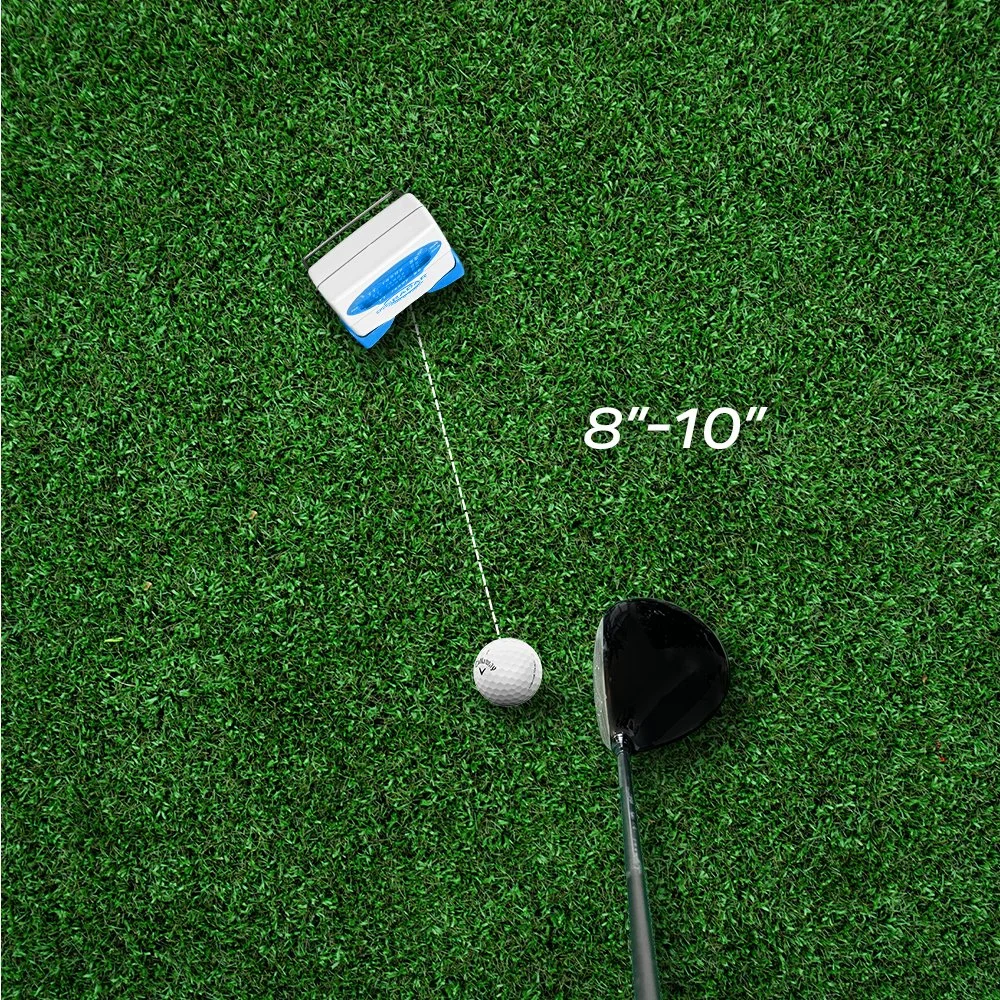
Place the unit 8-10” from your intended swing zone. You do not need a ball to measure your speed. Note that wood and iron clubs may read differently. See the placement guide below for further instruction.
Swing: When a swing is detected the READY bar will go out momentarily while the speed is being calculated and the display will indicate the measured swing speed. In less than a second, the radar will resume operation and the READY bar will light in preparation for the next swing.
Additional Notes
Your product comes with a threaded insert that attaches to a tripod and measures baseball and softball bat speed. See the Quick Start Guide for Baseball for further instructions.
Product Placement
Use the charts below to find the best radar placement for you or watch the video for further guidance on positioning.
-
![]()
Wood Club, Position 1
Place the device 8-10" from the ball. This is the best placement to start gauging your swing speed with and without a ball.
-
![]()
Wood Club, Position 2
If you are seeing too high of speed readings (140-150mph), your device is likely reading the exit velocity. Adjust the device to move forward slightly and facing backwards.
-
![]()
Iron Club, Position 1
Place the device 8-10" from the ball. This is the best placement to start gauging your swing speed with and without a ball. Works best with bulkier irons.
-
![]()
Iron Club, Position 2
Two-bladed irons can sometimes be too thin for an accurate reading. If your device isn’t picking up speeds, try moving slightly forward and angling it to get a better view of the clubface.
-
![]()
Iron Club, Position 3
An alternative placement for Position 2 is available if you're concerned about hitting your device. This option is recommended until you feel confident with your swing range.



Troubleshoot Tactics
Not turning on:
Firm Push: The button can be a little stubborn when it's new, this design keeps the unit from turning on when it is bouncing around in your golf bag.
Battery Check: Make sure the batteries are new and of high quality
Connection Confirmation: Make sure the battery cover is secure and tight.
Inaccurate speed readings:
Positioning: Is the unit positioned properly? Especially irons, (see illustrations below)
Interference: Are you near a magnetic wave source, e.g. too close to Wi-Fi, or directly under fluorescent lights. Remember Doppler radar reads waves, all waves.
Swinging Too High: If using an iron, are you swinging above the detection cone? If you are seeing numbers approximately 20 mph too slow, raise the unit a few inches. This often applies to training sticks such as Ryp Stick, SuperSpeed Golf, and The Stack System,
The Kickstand: The kickstand or bail should be close to the unit, not laid back 45 degrees. The unit should be nearly upright
Unit turns on, but does not register a swing:
Distance: You are swinging too far away, 8-10 inches to be safe.
Too High: Normally the result of using a high iron or training stick, elevate unit.
Fragmented numbers:
Your unit is likely loose. Squeeze it with two hands, are the numbers now clear? If yes, have one person squeeze and the other person tighten the 3 screws in the back (2 at the top, 1 in the battery compartment. If they are not clear, call customer service.
Need more assistance?
Sports Sensors is committed to customer satisfaction and provides free technical support. For direct customer support, contact Sports Sensors by calling 1-888-542-9246 or emailing support@swingspeedradar.com

Details
-
Size: 3 3/4" w (9.5 cm w); 5 1/2" lg (14 cm 1g); 1 5/16" th (3.3 cm th)
Weight: 11 oz. (312 g)
Display Type: 3 Segment LCD
Speed Units: Miles-Per-Hour (mph) and Kilometers-Per-Hour (km/h) selectable
Speed Range: Bat Mode, 20-200 mph; 32-320 kmh
Golf Mode, 40-200 mph; 64-320 kmh
Accuracy: Nominally within 1%
Batteries: Three AA batteries, (not included)
Operating Temperature: 40-110 degrees F (4.4-43 degrees C)
Storage Temperature: 32-120 degrees F (0-49 degrees C)
Related Patents: U.S.: 5,864,061; 6,079,269; 6,378,367; 6,666,089; 6898,971 B2
Canada: 2,248,114
Japan: 3,237,857
-
The Swing Speed Radar® is a unique electronics product intended for training and practice situations. Although the rugged design will withstand the rigors of normal use, it should be protected from golf club, bat and ball impacts; should not be dropped or thrown; or exposed to precipitation, or immersed in water or other liquids. Do not use or leave outdoors during inclement weather. Store the Swing Speed Radar® in typical in-house environments, avoiding excessive temperature extremes, humidity, dust and dirt.
The accompanying nylon pouch will afford modest protection from scratches, nicks and defamation from normal handling activities. Remove the three AA batteries if the unit will not be used for extended periods. Replace the batteries when low power is indicated. The Swing Speed Radar® can be cleaned with a slightly damped, soft cloth. Do not use alcohol, solvents, or chemical cleaners which can cause permanent damage. With proper care, the Swing Speed Radar® will provide many hours of service and fun for the users.
-
The Swing Speed Radar® is designed to provide trouble-free performance when used properly, and given proper care. Battery replacement is the primary corrective action that can be taken by the user. Symptoms of low or dead batteries are no display, a dim display, or an erratic display after the Function Button has been pressed. Other abnormal operating characteristics can also be caused by weak or loose batteries. Nearby sources that are "electrically noisy", such as fluorescent lights, electric motors, cell phones, or high power transmission lines, for example, can cause the spontaneous display of anomalous speed or tempo readings. Avoid close proximity to such sources when using the Swing Speed Radar®.
Display Freeze-Up
As most of us know from computer use, a microprocessor will occasionally "freeze-up" or lock in a condition that prevents normal operation. The microprocessor can be restarted by simply disconnecting a battery momentarily and reconnecting it. Open the battery door, disconnect one end of any battery, re-connect it and the problem should be corrected. If this problem occurs frequently, please call for technical support or service, as noted in the following section of this Manual.Swinging Without a Ball
"Swinging in air," without a ball is a satisfactory way to make relative measurements of swing speed changes or improvements. However, without a ball or equivalent target, the release of the club or bat is not as controlled as that which occurs when actually hitting a ball. Golfers in particular might notice a 5% to 10% lower swing speed when swinging without a ball. Therefore, when practicing "in the backyard," away from the range or course, use a plastic or foam practice ball to provide a hitting target if swing speed comparisons are to be made with actual ball contact swings. -
Remove the battery cover on the rear face of the unit. Insert the batteries, being careful to position the batteries with the proper polarity indicated by the orientation shown in the molded battery pockets. Depress the radar Function Button and perform the operating sequence described in the section of this manual entitled USING THE SWING SPEED RADAR®.
-
The Swing Speed Radar® has been tested and certified to meet requirements established by the Euro Union, Industrie Canada and the Federal Communications Commission. The FCC ID is NVE 364. "This device complies with Part 15 of the FCC Rules. Operation is subject to the following two condi-tions: (1) This device may not cause harmful interference, and (2) this device must accept any interference received, including interference that might cause undesired operation."
The Swing Speed Radar® complies with current standards established for safety levels of human exposure to radio frequency energy, including the requirements of C95.1-1992.2 defined by the American National Standards Institute (ANSI) and the Institute of Electrical and Electronics Engineers (IEEE); and those of the Canadian Department of Health and Welfare, Safety Code 6.
Use of the Swing Speed Radar®, or any other radiating device, may create problems when in close proximity to electronic medical devices, such as heart monitoring equipment or pacemakers/regulators. Avoid such use. ROHS and CE compliant.
-
What is covered? - This limited warranty covers all defects in workmanship or materials in your Swing Speed Radar® that is purchased directly from Sports Sensors, Inc. or from an authorized reseller. This warranty applies only to defects that occur while your Swing Speed Radar® is being used in the normal manner described herein. This warranty does not apply to any defects that are caused by misuse, abuse, neglect or improper storage, handling or maintenance, or any modifications or repairs performed by anyone other than Sports Sensors, Inc. Except as expressly stated in this warranty, Sports Sensors Inc. makes no implied warranties, whether of merchantability or fitness for a particular purpose or use or otherwise with respect to the Swing Speed Radar® with Tempo Timer, for more than one year from the purchase date.
How long is the coverage period?
This limited warranty runs for one year from the date that you buy the Swing Speed Radar®, as shown on your purchase receipt.What will Sports Sensors Inc. do?
If your Swing Speed Radar® fails during the warranty period and you return it before the end of this period, Sports Sensors Inc. will, at its discretion, and at no additional charge, repair or replace the defective unit. In no event shall Sports Sensors Inc. be liable for, or pay, any indirect, special, incidental or consequential damages in connection with your Swing Speed Radar®.How can you get service?
You must send the Swing Speed Radar ® appropriately protected and packaged, shipping charges prepaid, to Sports Sensors, Inc., 11351 Embassy Drive, Cincinnati, Ohio 45240, USA. Evidence of date and place of purchase, such as a copy of your sales receipt or other "proof of purchase", must company the returned unit. Please describe the nature of the problem or reason for return.How does state law apply?
This warranty gives you specific legal rights which vary from state to state. Some states do not allow the exclusion or limitation of incidental or consequential damages, so the above limitation or exclusion may not apply to you. This warranty is governed by the State of Ohio, USA.For technical support or service information, call, toll-free: (888) 542-9246. For ordering information, or to relate usage experience, please call toll-free: (888) 542-9246. Visit our Web Site for the latest information about the Swing Speed Radar®, or other new products, at: www.sportssensors.com
Sports Sensors is committed to customer satisfaction and provides free technical support. Review the detailed User Manual for more information. For direct customer support, contact Sports Sensors by calling 1-888-542-9246 or emailing support@swingspeedradar.com
